Reasons Archive Encryption Matters
Standard ZIP files are excellent for compressing data and combining multiple files into a single folder for straightforward emailing. That said, a standard ZIP file offers absolutely zero security. Anyone who intercepts the file, accesses your computer, or finds your USB drive can extract the contents instantly.
Learning how to password protect a ZIP file adds a crucial layer of cryptography to your data. When properly encrypted, a ZIP, RAR, or 7z file scrambles the underlying data using complex algorithms. Without the exact passphrase, the files remain mathematically impossible to read.
In this walkthrough,, we will walk through the most effective approaches to archive encryption, from free open-source utilities to professional-grade privacy suites.
The Complete Methods Guide
Method 1: How to password protect 7-Zip file
7-Zip is a free, open-source file archiver that supports strong AES-256 encryption. It is widely considered the standard for basic file compression and protection on Windows.
- Download and install 7-Zip from the official website.
- Highlight the files or folder you want to protect.
- Right-click, hover over 7-Zip, and select Add to archive...
- Under the "Encryption" section on the right side, type your desired password and confirm it.
- Ensure the Encryption approach is set to AES-256.
- Check "Encrypt file names" if you don't want others to even see the titles of the files inside.
- Click OK to generate your encrypted
.7zor.zipfile.
Best For
IT professionals and users who need a free, reliable, no-frills tool for one-off file sharing.
Limitations
Interface is dated; no native cloud sync; cannot secure or hide live folders on your hard drive.
Method 2: How to password protect WinRAR file
WinRAR is another legacy archiver famous for its .rar format. It offers robust password security similar to 7-Zip.
- Right-click the files and select Add to archive... (indicated by the books icon).
- In the General tab, click the Set password... button.
- Enter and re-enter your password.
- Check "Encrypt file names" for maximum privacy.
- Click OK twice to create your secure RAR archive.
Method 3: Encrypt ZIP file natively on Mac (Terminal)
While macOS lets you right-click and compress files, the graphical interface does not offer a password choice. You must use the Terminal.
- Open the Terminal app.
- Type
zip -er archive_name.zip file_to_protect.txtand press Enter. - Terminal will prompt you to enter a password and verify it (the keystrokes will remain hidden).
- The encrypted ZIP will be generated in your current directory.
Comparing Approaches
How do these approaches stack up? We evaluated them based on security, ease of use, and overall utility.
| approach | Difficulty | Security Protocol | Live Folder Locking? | Cost |
|---|---|---|---|---|
| 7-Zip | straightforward | AES-256 | No | Free |
| WinRAR | straightforward | AES-256 | No | Paid (Nagware) |
| Mac Terminal | Hard | PKZIP (Legacy) | No | Free |
| Folder Lock 10 | Easiest | AES-256 | Yes | Premium |
| Editorial Verdict: 7-Zip wins for a free, bare-bones solution to send a single file. Folder Lock wins for users who need persistent encryption on their devices, real-time folder locking, and cloud backups. Mac Terminal should be avoided for highly sensitive data due to legacy encryption protocols. | ||||
ZIP vs 7-Zip Encryption
When determining ways to create encrypted archive files, understanding the underlying format is critical. A standard ZIP file encrypted with older software often uses ZipCrypto, a legacy algorithm that can be easily cracked using modern GPU brute-forcing tools.
Modern applications, whether it is 7-Zip or comprehensive suites like Folder Lock, utilize AES 256-bit encryption. This military-grade standard has never been cracked mathematically. When protecting sensitive financial documents, tax returns, or private photos, always ensure the software you are using specifies AES-256 instead of standard "ZIP password security."
Problem Solving Archive Issues
Ways to open password protected ZIP without password
In our testing, if the archive was encrypted using AES-256, bypassing the password is impossible. If you forgot the password, your only recourse is utilizing brute-force dictionary attack tools to guess it. If the password was long and complex, the data is permanently inaccessible.
Ways to crack ZIP password (ZipCrypto)
If the file was compressed using legacy ZipCrypto (often the default on older Windows XP/7 systems), specialized security software can sometimes exploit weaknesses in the algorithm to recover the password. We advise moving all legacy ZIPs to modern AES-256 containers immediately.
Tools We Tested and Reviewed
We tested several utilities to find the best archive encryption software. While traditional archivers compress and password-protect data into static files, modern users often need dynamic, real-time protection. Here is what we found.
Folder Lock 10
Windows, macOS, iOS, Android • $39.95/yr
Reasons we recommend it
Of all the choices we covered, we recommend Folder Lock for most users since it fundamentally changes how file security works. Instead of creating a ZIP file every time you want to secure a document, Folder Lock creates a permanent encrypted "Locker" (a virtual drive). You drag and drop files into it, and they are encrypted instantly. It is much faster and less prone to user error than manual ZIP archiving.
- AES 256-bit on-the-fly encryption
- Locks and hides folders directly in Windows/Mac
- Mobile apps for iOS & Android with Wi-Fi transfer
 Download for Windows
 Download for iOS

Folder Lock Pro
Desktop & Mobile Suite
Creates secure vaults instead of static zip files.
Not ideal for: Users who just need to email a single protected file to someone who does not have the software installed. In that case, a standard ZIP tool is better.
7-Zip
The best free, open-source file archiver. We recommend 7-Zip if you solely need to compress a folder and attach it to an email securely using AES-256.
WinRAR
A staple in the archiving world. WinRAR handles large multi-part archives exceptionally well, but its trial-nag screen model makes it slightly annoying for daily use.
Ways to lock a ZIP folder with password using Folder Lock
If you opt for a dedicated security suite instead of a basic archiver, the workflow changes slightly. Here is how you protect files using our recommended tool.
Create a Locker
Open Folder Lock and navigate to "Encrypt Files". Click "Create Locker". Think of this as your secure container (functioning similarly to a ZIP archive, but mounted as a virtual drive).
Set Your Master Password
Assign a strong AES-256 password to this locker. Remember, there are no backdoors—if you lose this password, the data cannot be recovered.
Drag and Drop Files
Once the locker is open (mounted as a Z: or X: drive on your computer), simply drag any files, folders, or ZIP archives into it. They are encrypted instantly on-the-fly.
Close to Secure
Close the locker within the app. The virtual drive disappears from Windows Explorer, and your data is completely secured into an encrypted standalone file.
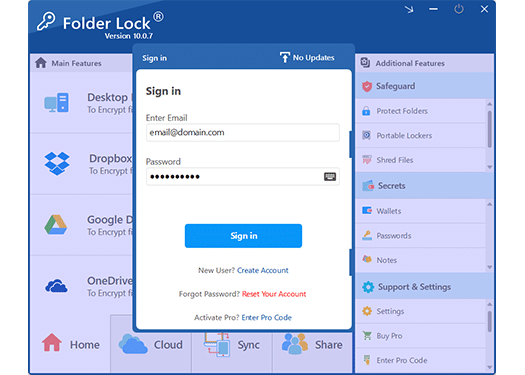
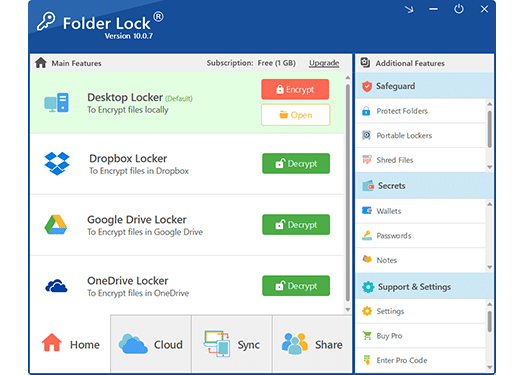
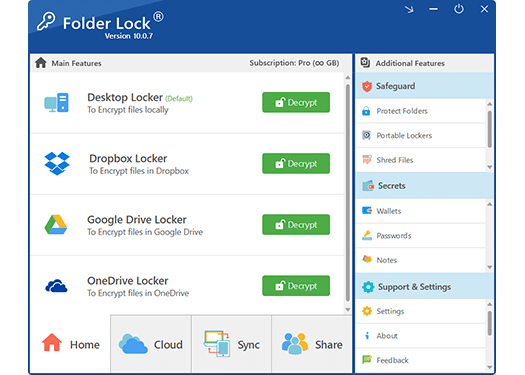
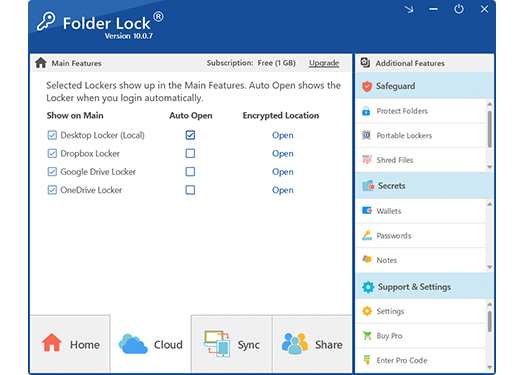
Interface Tour
A closer look at Folder Lock's desktop application interface. Unlike clunky legacy archivers, it offers a clean, modern dashboard for managing all your encrypted lockers, secure backups, and privacy controls.
(Click any image to enlarge)
Beyond ZIP Files: Advanced Platform Features
While standard archiving utilities stop at basic file compression, premium security suites expand into comprehensive endpoint protection. Based on our analysis, here is an editorial breakdown of the extended privacy tools our top recommended software offers across various operating systems.
Windows Ecosystem

Kernel-Level Folder Hiding
Bypass lengthy encryption times for non-critical data. You can lock and hide entire folders from Windows Explorer instantly; they remain invisible even if the system is booted into Safe Mode.

USB & Portable Lockers
Convert standard USB thumb drives or external hard disks into encrypted, portable vaults. These self-contained lockers can be accessed on external PCs without needing to install the host software.

Cloud-Synced Vaults
Create localized encrypted containers directly inside your Dropbox, Google Drive, or OneDrive synced folders. Your data is AES-256 encrypted locally *before* it ever touches the cloud.

Wallets, Shredding & History
Store credit cards and passwords in structured digital wallets. Additionally, permanently overwrite deleted files (shredding) and automatically wipe your Windows usage tracks to maintain absolute local privacy.
MacOS Capabilities

Native macOS Integration
Built to mirror the intuitive, minimalist design language of the Apple ecosystem. It fills the gap left by macOS's lack of native folder-locking functionality without relying on clunky, ported Windows interfaces.

Cross-Platform Sync & Share
Seamlessly sync your encrypted files across iPhones, iPads, Androids, and PCs. You can also securely share selected encrypted files with authorized colleagues without giving away your master password.
Android & iOS Capabilities
Media Vault & App Locking
Securely hide personal photos, videos, and voice recordings from your native phone gallery. On Android, you can also lock individual applications (like WhatsApp or your email) behind an additional PIN.

Intruder Monitoring & Stealth Browser
Automatically log and monitor unauthorized attempts to access your locked apps (including capturing intruder photos). Safely browse the web using a native secure browser that leaves absolutely zero local cache or history.
The underlying cryptographic architecture is utilized by important global institutions—including NASA, HSBC, MIT, and Dell. It boasts consistently high ratings across independent software authorities like PCWorld, CNET, and Softonic, averaging a 5-star aggregate review rating.
Folder Lock Pricing: What You Get
If you decide to upgrade from free tools like 7-Zip, here is a reference breakdown of Folder Lock's tiers.
Free Version
Limited function set for testing
- Up to 1 GB Locker size
- Max 2 sync devices
- No portable USB lockers
- No immediate folder protection
Folder Lock 10 Pro
Complete endpoint security suite
- Unlimited Locker size
- Sync up to 5 devices
- Portable Lockers for USB/External drives
- Advanced tools (Shredding, Wallets, History)
Already a customer? Click here to retrieve your Lost Registration
Is it worth it? If you manage business documents, client data, or highly sensitive private information, the $40 yearly cost is a reasonable investment to prevent data breaches compared to using free tools.
Which method is right for you?
Explore the Wider Security Ecosystem
If your privacy requirements extend beyond standard directory encryption, the developers behind our top pick offer a comprehensive suite of specialized protective applications.
Common Questions and Answers
How to crack ZIP file password?
Cracking a ZIP password legally (if you forgot your own) requires specialized brute-force dictionary attack software. That said, if the ZIP was protected with AES-256 and a robust password (12+ characters), it is computationally unfeasible to crack it with modern technology.
What is the best archive encryption software?
For free, bare-bones archive creation, 7-Zip is the best choice. For comprehensive data protection, including cross-platform mobile access, Wi-Fi transfer, and virtual encrypted drives, we recommend Folder Lock.
How to make RAR file password-secured?
You must install WinRAR. Select the files, right-click, choose "Add to archive...", go to the General tab, click "Set password", input your password, check "Encrypt file names", and hit OK.
Compress and encrypt folder: Which is better?
If you need to email the folder, you must compress and encrypt it into a single ZIP or RAR file. If the folder remains on your PC or USB drive, using on-the-fly encryption software (like Folder Lock) is superior since you don't have to constantly extract and re-compress files to edit them.
Our Verdict
Securing your data is no longer optional. Whether you are sharing tax documents with your accountant or securing business assets on a laptop, knowing how to password protect a ZIP file is a fundamental digital skill.
While native OS tools have largely abandoned this function, robust solutions exist. For basic, zero-cost file compression and encryption to send over email, 7-Zip remains our recommended open-source utility.
That said, if you are looking to secure folders on your local machine, protect portable USB drives, and synchronize encrypted lockers across your Windows PC, Mac, and mobile devices seamlessly, Folder Lock is the best choice available. Its transition from static archives to dynamic, encrypted virtual drives fundamentally improves user privacy.
